Recent post

Apple Releases iOS/iPadOS 17.3 With Stolen Device Protection and More

Apple has just released new software for the iPhone, iPad, Apple Watch, and Apple TV. Here is what’s new.

iOS/iPadOS 17.3

First up, Apple has released iOS/iPadOS 17.3. You can download the update by going to Settings > General > Software Update on your iPhone or iPad.

The major new feature is Stolen Device Protection for the iPhone. With that feature, Face ID or Touch ID is required to perform certain actions. That further protects the information on your smartphone is someone is able to find out your passcode and steal the device.

Apple Music fans can also enjoy a collaborative playlists with others.

Here’s the entire changelog:

Stolen Device Protection
– Stolen Device Protection increases security of iPhone and Apple ID by requiring Face ID or Touch ID with no passcode fallback to perform certain actions
– Security Delay requires Face ID or Touch ID, an hour wait, and then an additional successful biometric authentication before sensitive operations like changing device passcode or Apple ID password can be performed

Lock Screen
– New Unity wallpaper honors Black history and culture in celebration of Black History Month

Music
– Collaborate on playlists allows you to invite friends to join your playlist and everyone can add, reorder, and remove songs
– Emoji reactions can be added to any track in a collaborative playlist

This update also includes the following improvements:
– AirPlay hotel support lets you stream content directly to the TV in your room in select hotels
– AppleCare & Warranty in Settings shows your coverage for all devices signed in with your Apple ID
– Crash detection optimizations (all iPhone 14 and iPhone 15 models)

watchOS 10.3/tvOS 17.3

Apple Watch users can now download watchOS 10.3

It features the new Unity Bloom watch face, pictured above. There are other smaller bug fixes and improvements.

The update can be downloaded now through the companion Watch app on your iPhone by heading to General > Software Update in the My Watch portion of the app. You can also go to Settings > General > Software Update on an Apple Watch.

Your watch needs to have more than 50 percent power and connected to a charger. Like most Apple Watch updates, it could take anywhere from 30 minutes to an hour to complete, so be patient.

It’s compatible with the Apple Watch Series 4 and later.

tvOS 17.3 has also arrived for the Apple TV. There are no known new features.

An update should automatically be downloaded to an Apple TV HD or Apple TV 4K.

If you haven’t already enabled automatic updates, you can download the software by heading to Settings > System > Software Updates > Update Software. Right next to the button to update software is the toggle switch to turn on automatic updates.


source AppAdvice.com Latest https://ift.tt/cq7Ba43

Hit the Road in the Beautiful Racing Game Art of the Rally

Get behind the wheel and explore 78 stages of driving action across the world in the new game Art of the Rally.

The top-down racer celebrates the golden age of rally as you’ll travel to locations like Finland, Sardinia, Norway, Japan, Kenya, and Indonesia.

You can race in a host of vintage cards from the 1960s to 80s.

To begin the game, you can truly customize the racing experience that’s best for you. You can race in manual or automatic transmission and change the percentage of stability assist or anti-lock braking.

There are a number of modes to play in the game. Along with a comprehensive Career Mode, Time Attack allows you to race for the fastest possible time. Custom Rally lets you create the perfect rally and select the location, number of stage, AI difficulty, and damage level.

Head online to compete in a daily and weekly challenge.

For inexperience racers, you can also choose Free Roam to explore the different stages and get the hang of the natural and well-designed control system.

And to show off you driving skills, or anything else in the game, there is even an integrated Photo and Replay mode. You’ll definitely want to enjoy the scenery along with the driving action. At 60fps on my iPhone 14 Pro Max, the game looks wonderful.

For the iPhone and all iPad models, Art of the Rally is a $4.99 download on the App Store now.


source AppAdvice.com Latest https://ift.tt/Oi6vYbP

Be Head of the Class With the Updated Schooly App

If you’re a student, you need Schooly.

The cross-platform app helps you manage an academic endeavors with schedule, assignments due, and much more.

At the start of the year, you can add in a schedule, even with repeating weeks and block schedules. You can add the teachers and classroom. For easy access, you can add a schedule to your home screen with a widget.

Head to the app to create assignments so you will also know what you need to work on.

Thanks to iCloud sync, your information will be available on all of your devices. While on the go, you can even see your schedule and what is due on the Apple Watch.

With a recent update, the app has gotten even better with a numbers of new features. You can now mark off and track completed assignments. And a new interactive widget allows you to check off an assignment directly from your home screen without even opening the app.

A redesigned home screen view in the app also shows better insights into your upcoming scheduled and assignments.

The app is developed by 18-year-old Australian Oscar Gorog. The WWDC 2020 scholarship winner created the app because he couldn’t find any other good options to organize he school work on the App Store.

Even though my school days have longed passed, it’s obvious that the app is well-designed and should make any students life just a bit easier.

Schooly is for the iPhone, iPad, Mac, and Apple Watch. It’s a free download on the App Store now.

A Schooly Pro tier is available for a subscription of $0.99 per month, $9.99 per year, or $24.99 for the lifetime of the app. That unlocks a number of additional features including the ability to add more than 10 assignments, receive notifications for due work, send due items to friends, use Siri Shortcuts and add assignments directly on the Apple Watch.


source AppAdvice.com Latest https://ift.tt/PpHLxkX

Explore Art Therapy and Mindfulness With Groodles

Days are short and the weather is getting colder. And you’re probably spending even more time inside. That can take a toll on your mental health. An interesting new app, Groodles, is made to provide art therapy and mindfulness.

The iPad only app features a wealth of art-based exercises. Some of the wide variety of topics include daily reflections, reflection on what makes you happy, why you are anxious, an exercise at bedtime, and much more. Before starting, you’ll see the time each exercise takes

Completing an exercise is easy and can even be used by kids. You can use an Apple Pencil or even just your finger. Step-by-step audio instructions will guide you through the entire process. There are the usual drawing tools at the bottom of each page.

While I didn’t know what to expect, the prompts were great and I enjoyed completing a number of the exercises. Each one helps turn focus inward and help you better understand yourself in a journey of self-discovery that can be important for everyone.

All of the content is available offline, which is a huge plus for a plane ride or somewhere without an internet connection. The app also supports dark mode and can be used in both portrait and landscape orientation.

I’ve just been using Groodles for a few days but have come away impressed. I’m not exactly an artists, but the app is welcoming and easy for anyone to use. Give it a try and see if you can fit it into a daily routine.

Groodles is a free download on the App Store now,. You’ll be able to try out the app for free for three days and then need a subscription to keep using it. That’s $29.99 yearly.

Subscribers will be able to access hundreds of original artworks to guide you and additional content and exercises.


source AppAdvice.com Latest https://ift.tt/boNgDxe

Apple’s Vision Pro Will Launch With Large Roster of Streaming Apps and Other Experiences

With Apple’s Vision Pro available for pre-order on Friday, the company is providing even more information about the apps and more launching with the headset.

In a new release, Apple confirmed that users will be able access a number of popular streaming apps on the service including Disney+, ESPN, MLB, PGA Tour, Max, Discovery+, Amazon Prime Video, Paramount+, Peacock, Pluto TV, Tubi, Fubo, Crunchyroll, Red Bull TV, IMAX, TikTok, and MUBI.

When watching Disney+, you will be able to watch TV and movies in four iconic and highly-detailed environment. Some of those include the Scare Floor from Monsters Inc., Marvel’s Avengers Tower looking into Manhattan, and the cockpit of Luke Skywalker’s land speeder facing a binary sunset on Tatooine.

A number of 3D movies will also be available including The Way of Water, Dune, Spider-Man: Into the Spider-Verse, and The Super Mario Bros. Movie.

Vision Pro will also feature Apple Immersive Video. Those will be 180-degree 3D 8K recording with Spatial Video. Some of those available will include Prehistoric Planet Immersive and Alicia Keys: Rehearsal Room.

Dinosaur fans will also enjoy the Encounter Dinosaurs app developed by Apple and shipping with Vision Pro. It will give users a peak into the Cretaceous period more than 66 million years ago.

Pre-orders for the $3,499 device will open two weeks before at 5 a.m. PT on Friday, Jan. 19. Optical inserts will cost $99 for readers and $149 for a prescription.

Apple terms the headset spatial computing. Running visionOS, the device will feature an App Store with compatible iOS and iPadOS apps along with titles made just for the device.

Instead of controllers, you’ll interact with simple hand gestures like a finger pitch. Siri support will also allow you to interact with the device and things like open an app or play media.


source AppAdvice.com Latest https://ift.tt/LcCZpfk

5 Best Apps for New Apple TV Users

Do you have a new Apple TV 4K and are looking for something to watch and explore what the streaming device has to offer? We’ve got you covered with this list of the must-have apps for Apple TV.

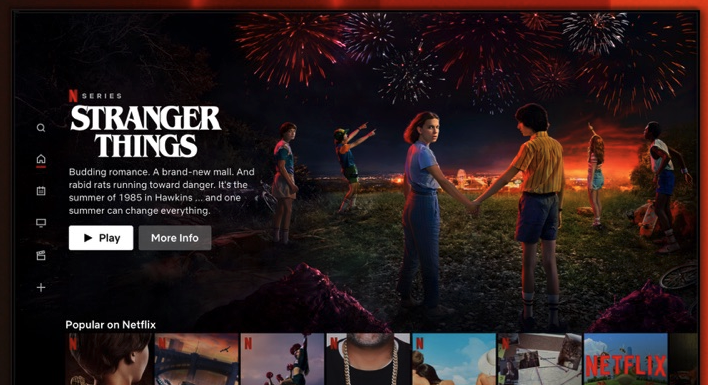
Netflix

Everyone has heard of Netflix—it’s the leading Internet streaming service for most of the hot shows and movies that you can’t miss.

Netflix streaming has a lot of popular shows as well as original series that are worth watching. Plus, you can always find a decent movie to watch when it’s movie night.

While the app is free, you’ll obviously need a subscription. There are a number of options available.

Sling

Sling TV is a solid option for watching the shows, sporting events, and channels you love on your iPhone or iPad. But, now you can check out Sling TV for your Apple TV making your favorite live television and on-demand shows only a click away.

The Apple TV is a great alternative to traditional television services. The app is clean, crisp, and simple to use. The channel and show options are extensive with something for everyone in the house.

You’ll need a subscription to the get most out of the service.

CARROT Weather TV

CARROT Weather provides users with a sleek, minimalistic interface, comprehensive forecast reports and details, and humorous, sarcastic comments. You can get the current temperature, see the forecast for the rest of the week or by the hour, and get detailed bits of information like precipitation chance, humidity, and more.

Plus, there’s a fun time travel feature if you are curious what the weather was like in the past or even get a prediction for the future, and you unlock many secret locations from all over the fictional world. CARROT Weather is one of the best weather apps available on the App Store and for good reason.

The app is a $3.99 download.

Scenic Loops

Whether you have your Apple TV in the home or in the office, Scenic Loops gives you calming and comforting video views of nature. Perfect for waiting rooms, relaxation spots, or simply turning your black screen into a window of beauty, the app is makes an ideal screen saver.

For beautiful HD videos of nature, Scenic Loops has wonderful options that include soothing sounds and tranquil views. It’s definitely worth the $0.99.

El Hijo

And the Apple TV is also a great way to enjoy games. One of the best is El Hijo. The 2022 Apple TV Game of the Year chosen by Apple, El Hijo, is a perfect game for the whole family.

In the non-violent stealth game, you’ll rely on the mischievousness of the 6-year-old titular character to hide in the shadows and survive in the old west. Along with a number of tricky environmental puzzles, you’ll enjoy the storyline of a brave son searching for his mother.

The game is a $9.99 download. Along with the Apple TV, you can also play the game on your iPhone or iPad.


source AppAdvice.com Latest https://ift.tt/7Hik8Gn

Be Prepared to Wait While Playing the Unique Idle Game The Longing

As Tom Petty once said, the waiting is the hardest part. And prepared to do a lot of that in the new game The Longing.

If you’re tired of fast-paced games, you’re in luck. Part adventure and part idle game, you’ll be controlling s lonely Shade who is the late servant who to a king who once ruled an underground kingdom. The king’s powered have disappeared, and he falls asleep for 400 days to regain his might.

And it’s the Shade’s duty to stay in the palace until the King awakes. Time will pass as it does in the real world, so it will truly take 400 days. Once the game starts, there is a timer that will countdown on top of the screen.

So it’s up to you to decide how to pass the time. Fortunately, there are a few things for you and the Shade to try out to help pass time.

Some of the things you can do include take a walk in caverns at a slow pace and collect items for your underground living room or read classic literature like Moby Dick directly in the game.

For the more adventurous, you can ignore the king’s commands and try to advance to the outer regions of the cave in a lon and dangerous journey.

Along the way, there are a number of hidden secrets to find. You’ll also enjoy time-based puzzles.

There’s even more good news in 400 days as there are various endings to the game.

I’ve just started the game and am interested to see how the time passes. It’s a unique take on gaming.

Designed for the iPhone and all iPad models, The Longing Mobile is a $4.99 download on the App Store now.


source AppAdvice.com Latest https://ift.tt/KP9WFHG